
A phone can have excellent hardware and still feel incomplete if the apps you need are difficult to find. For Huawei users living, studying or working overseas, the real goal is simple: install trusted local services, keep them updated and make sure important features work after setup.
Build an App List Before You Start
Write down the apps you use for banking, transport, delivery, shopping, communication and work. Then separate them into three groups: apps available in AppGallery, services with an official website or web app, and apps that depend on Google services.
This quick check prevents random downloads and makes the huawei google play store setup more manageable.
Use Official Sources First
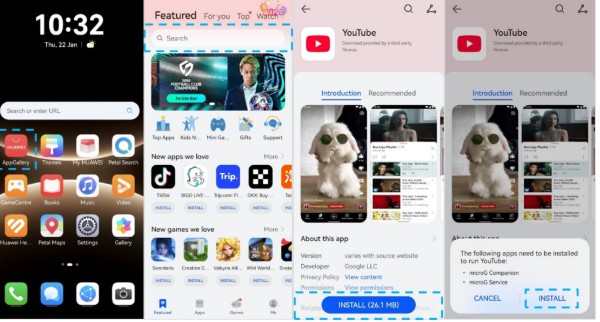
Search AppGallery using the exact app name and verify the publisher before installation. If results look limited, check the region linked to your HUAWEI ID, since app catalogues can differ between countries.
Huawei’s community instructions show a straightforward route for supported Google apps: find the app in AppGallery, complete the account sign-in and install GBox if the required app is unavailable directly. See the official huawei google play store walkthrough for the current sequence.
Add Apps That Are Not in AppGallery
For a local service that does not appear in AppGallery, go to the company’s verified website. Some providers offer an APK; others run a mobile website that works well in a browser. Adding that page to the home screen can create an app-like shortcut without installing third-party software.
Do not use unofficial APK libraries for banking, payment, health or government services. An outdated or modified package may fail to update and can expose sensitive data.
Check More Than the Login Screen
Once an app opens, test its key functions. A transport app needs accurate location access. A banking app may require biometric authentication and security verification. Messaging and delivery apps need reliable notifications. Google-dependent apps may also need background permissions to work consistently.
If something fails, update the phone and AppGallery, review permissions, clear the app cache and reinstall from the trusted source. Compatibility can differ by model, EMUI version, country and app developer.
Keep the Setup Simple
The most reliable method is a source hierarchy: AppGallery, the provider’s official website, a secure web app, and then a compatibility tool where necessary. This approach reduces risk while keeping everyday local services within reach.
Before configuring Google-dependent apps, use the huawei google play store page as the reference point and confirm that the steps apply to your device.


